
Stop telling AI, “Reply to this email.”
That might not even be the job.
When we talk about using AI for business emails, a lot of the conversation focuses on getting AI to write the response.
But sometimes the email is not really asking you for words. It is asking you to do something.
Before you ask AI to write the email, identify the do.
The do is the actual task or action the email is asking you to complete.
What Is the Email Actually Asking You to Do?
Think about the emails you receive during a normal workday. Somebody may ask where to find a file, for a project update, for sales numbers, for a calculation, for a document review, or for research.
Some questions have answers you already know. Others require you to find a document, open a spreadsheet, review a presentation, pull data, calculate numbers, research information, check a system, or complete another task.
Only then are you ready to write the email. Instead of immediately saying, “Reply to this email,” start with: “What is this email asking me to do?”
A Simple AI Email Example
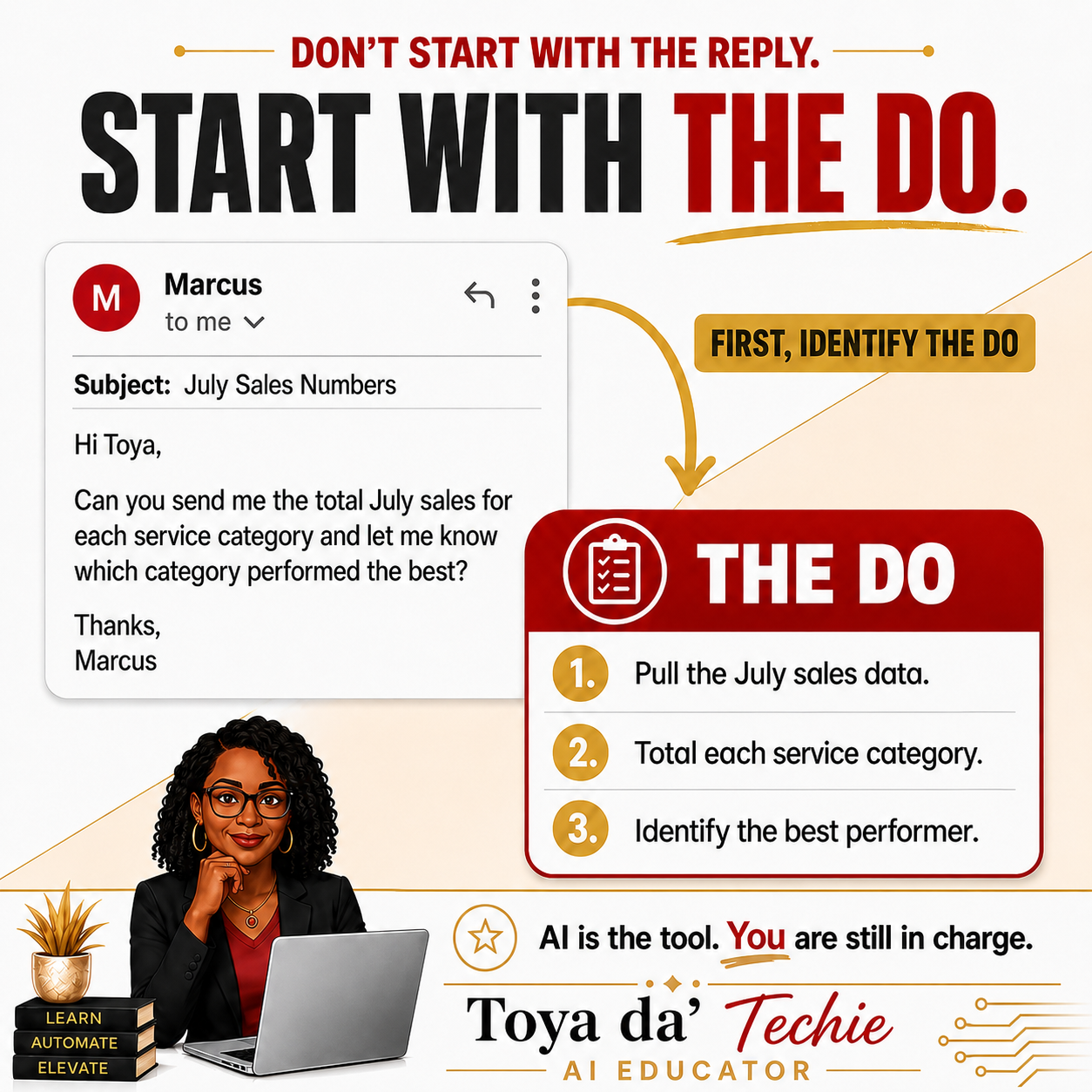
Imagine you receive this email from Marcus:
Subject: July Sales Numbers
Hi Toya,
Can you send me the total July sales for each service category and let me know which category performed the best?
Thanks,
Marcus
Marcus does not need a beautifully written email yet. Marcus needs the numbers.
- Pull the July sales data.
- Total the sales for each service category.
- Identify which category performed best.
- Then report the results.
That is the do.
How to Use AI to Answer This Business Email
Step 1: Protect the Information
Before putting business information into any AI tool, check what you are allowed to share. Do not automatically paste confidential, proprietary, customer, employee, financial, or organizational information into an AI system.
Follow your company’s policies and use only information and AI tools you are authorized to use.
Step 2: Ask AI to Identify the Do
For Marcus, AI should identify the July sales totals by service category and the best-performing category. Now we know the do.
Step 3: Give AI What It Needs to Complete the Task
If your approved AI tool is allowed to work with the sales spreadsheet, provide the appropriate file or data.
Step 4: Human Check the Do
Do not assume the numbers are correct simply because AI produced them. Check the totals, compare the answer with the original data, and make sure the result makes sense.
AI is the tool. You are still in charge.
Step 5: Now Ask AI to Write the Email
You Can Even Add a Little Shnaz
With verified numbers, an approved tool may also help create a simple chart, one-page PDF summary, visual comparison, short table, or presentation slide.
The visual supports the work. It does not replace your responsibility to make sure the information is correct.
Dictation Can Make This Even Easier
Sometimes it is easier to say what you know than to type the perfect instruction.
Then guide the tool: “Shorten it,” “Make this sound more like how I naturally speak, but keep it professional,” or “Add the directions I gave you.”
AI Can Help With the Work. You Still Make the Decision.
AI can help write, organize, analyze, summarize, calculate, or prepare supporting materials when the tool, permissions, and information allow it.
The human still decides what can be shared, what the email needs, what tools should be used, whether the result is correct, and what is ultimately sent.
A Simple AI Email Workflow You Can Reuse
- Read the email.
- Protect private or proprietary information.
- Ask AI: “What is this email asking me to do?”
- Identify the do.
- Decide whether you know the answer or need another task first.
- Give AI information it is allowed to use.
- Guide AI through the task.
- Human check the do.
- Give AI your verified information.
- Then ask it to help write the final email.
Frequently Asked Questions About Using AI for Business Email
Can AI reply to business emails?+
Yes. AI can help draft a response, but complete and verify any research, calculations, files, or other work the email requires first.
What should I ask AI before it replies to an email?+
Ask: “What is this email asking me to do?” This separates the writing task from the business task behind it.
Can I use ChatGPT to write professional emails?+
Yes. It can draft, rewrite, shorten, organize, or change the tone. Review the final message for accuracy, privacy, tone, and context.
Can AI analyze an Excel spreadsheet for an email response?+
Some approved AI tools can work with spreadsheet data. Follow your organization’s policies and always verify calculations and conclusions.
Should I paste a company email into AI?+
Only if you are authorized. Protect private, confidential, proprietary, customer, employee, financial, and organizational information.
Do I need a complicated AI prompt to answer an email?+
No. Start by clearly explaining what you need. A useful first question is: “What is this email asking me to do?”
What kind of “do” is sitting in your inbox right now?
Ready to practice?
Explore the AI Made Easy ClassThis article was expanded from the original August 12, 2026 Toya da’ Techie LinkedIn post. Read the original post on LinkedIn →