
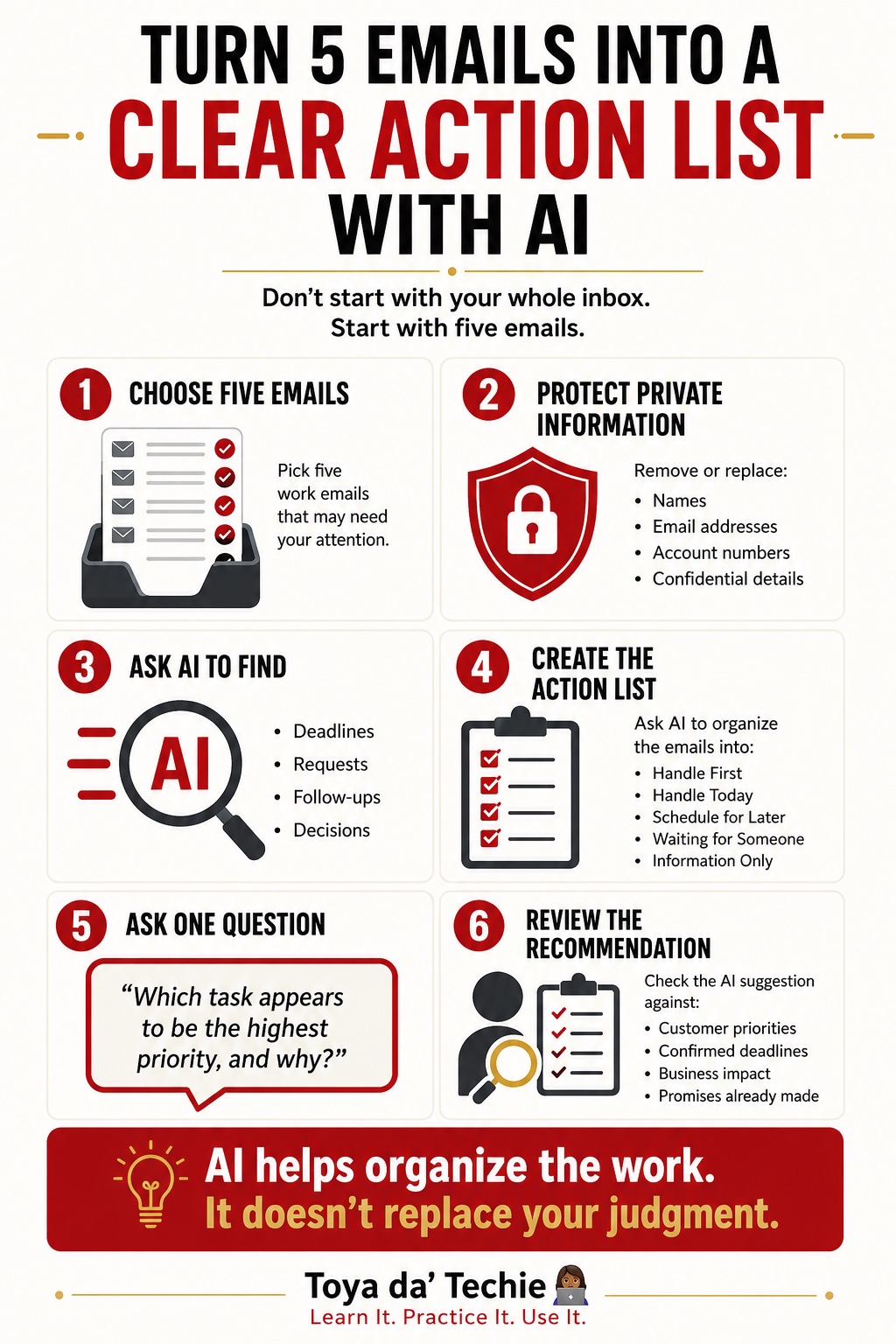
Most people ask AI to organize their entire inbox. I wouldn’t.
One of the biggest problems with a busy inbox is not simply finding your emails. It is figuring out: What deserves my attention first?
That is an important difference because AI can help organize the information in your inbox, but it does not automatically understand everything that matters to you, your business, your customers, or your team.
AI does not know which customer matters most to you. It does not know which deadline could create a bigger problem if you miss it. It does not know what promise you made during yesterday’s phone call. That information comes from you.
But AI can still be extremely useful. The key is giving it a smaller, clearer job.
Start With Five Emails, Not Your Entire Inbox
When I use AI to help me sort through email, I do not start by asking it to clean up everything. I start small.
Take five emails that need your attention. Before sharing business information with an AI tool, remove private, confidential, customer, employee, financial, or other sensitive information that should not be shared.
Then ask the AI to help identify four things:
- Deadlines — Is someone waiting for something by a certain date?
- Requests — What is someone asking you to do?
- Follow-ups — Who needs a response or another action from you?
- Decisions — Is there something you need to approve, choose, or decide?
Now you have something much more useful than a crowded inbox. You have a clearer picture of the work sitting inside those emails.
Ask AI to Help You See the Priority
Once the information is organized, I ask one simple question:
“Which task appears to be the highest priority, and why?”
Notice the wording. I am not telling AI, “Decide what I should do.” I am asking what appears to be the highest priority based on the information available.
That gives me a recommendation I can review. Sometimes I agree with it. Sometimes I don’t. And that is exactly how it should work.
AI Can Help With the Work. You Still Make the Decision.
AI does not need to become the decision-maker to be useful. It can help you:
- Pull important details out of information.
- Identify deadlines you may have overlooked.
- Group similar requests.
- Find follow-up items.
- Summarize what requires a decision.
- Compare the information in front of you.
- Suggest what appears to need attention first.
Then you review the recommendation. You know the customer, the project, the promises you made, and what is happening inside your organization. You know information the AI may never have received. That human knowledge matters.
A Simple AI Email Prioritization Workflow
- Choose five emails. Start with a small group of messages that require your attention.
- Protect private information. Remove confidential or identifying information before providing content to an AI tool.
- Ask AI to organize the information. Ask it to identify deadlines, requests, follow-ups, and decisions.
- Ask about priority. Try: “Which task appears to be the highest priority, and why?”
- Review the answer yourself. Check the deadline, missing context, commitments, and what actually needs attention first.
- Make the final decision. Use AI’s organization and recommendation to help you think, then use your judgment to decide what happens next.
The Goal Is Not to Hand Your Inbox Over to AI
The goal is to reduce the amount of time you spend digging through information just to understand what needs to be done.
There is a big difference between using AI to support a decision and allowing AI to make the decision for you. For business owners, corporate professionals, nonprofit professionals, leaders, and teams, that difference matters.
Technology should help you spend less time sorting information and more time doing the work that actually requires your experience, judgment, relationships, and leadership.
Start with one real task. Learn what AI can help you organize. Practice the process. Then use the information to make a better-informed human decision.
Try It
Take five emails from your inbox today. Identify the deadlines, requests, follow-ups, and decisions. Then ask AI which task appears to have the highest priority and why.
Before acting on the answer, review it yourself. Would AI’s suggested priority match the one you would choose?
Frequently Asked Questions About AI Email Prioritization
How can I use AI to prioritize my emails?
Give AI a small, approved group of emails and ask it to identify deadlines, requests, follow-ups, and decisions. Then ask which task appears most urgent and review the reason yourself.
Can ChatGPT help me decide which email to handle first?
It can recommend which task appears to deserve attention first based on the information you provide, but you should make the final decision using your business context and commitments.
How can AI help manage a busy business inbox?
AI can extract action items, group similar requests, identify deadlines, and summarize decisions so you spend less time sorting information.
Can AI identify deadlines and follow-ups in emails?
Yes. With appropriate, privacy-safe email content, AI can identify stated dates, requested responses, open follow-ups, and decisions that need attention.
Should I let AI decide which emails are most important?
No. AI may suggest a priority, but it may not know your customer relationships, promises, project context, or organizational rules.
How can I use AI for email management without giving it too much control?
Limit the task, remove sensitive information, ask AI to organize rather than act, and review every recommendation before making a decision.
What is a simple AI workflow for organizing business emails?
Choose five emails, protect private information, identify deadlines, requests, follow-ups, and decisions, ask what appears most important, then review and decide yourself.
Ready to practice?
Explore the AI Made Easy ClassThis article was expanded from an original Toya da’ Techie LinkedIn post. Read the original LinkedIn post →